Items table
1 min read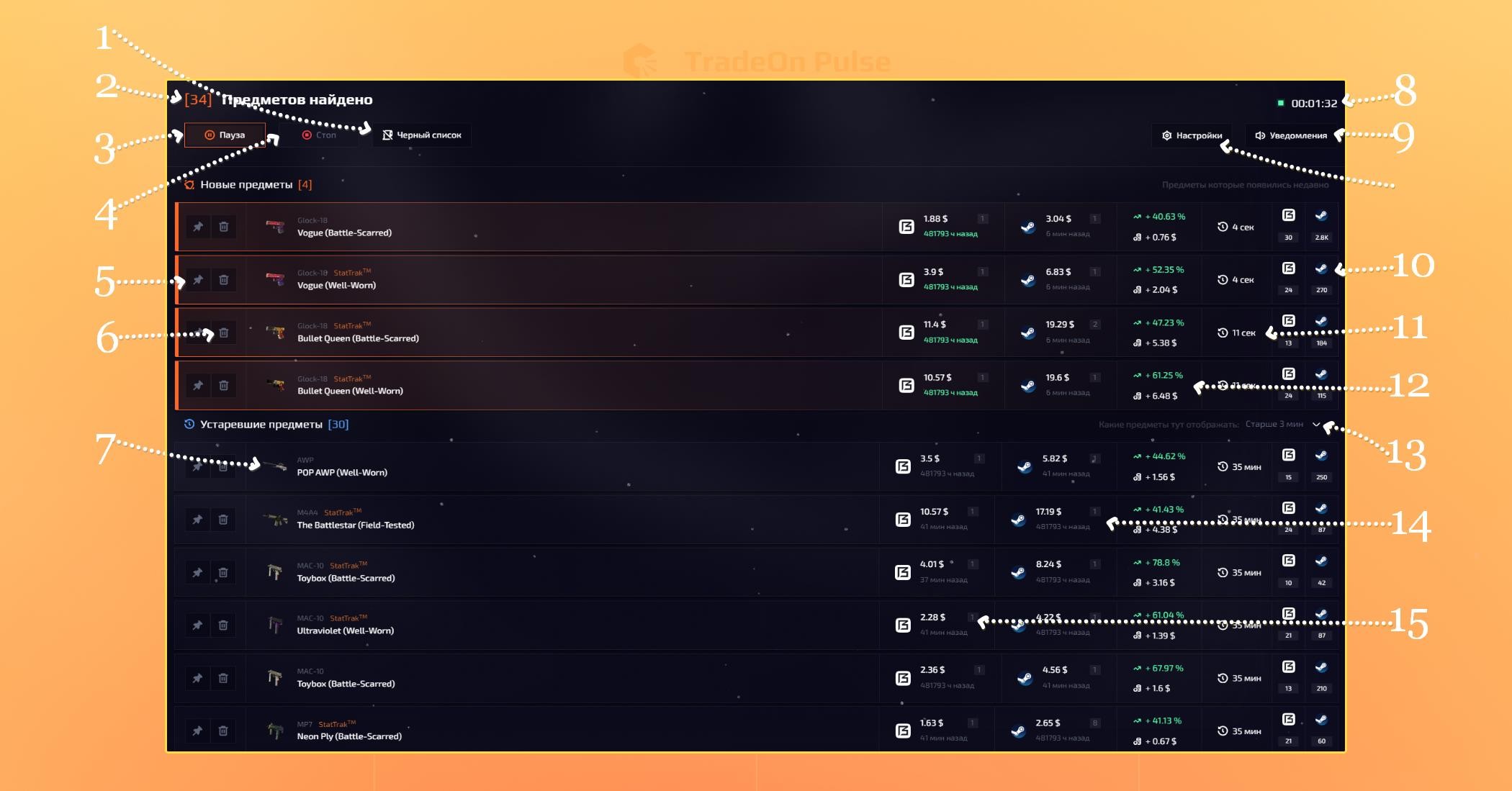
Items table
It shows all the items found by your schemes.
- Blacklist - lets you specify items that must never be searched for by your scheme under any circumstances.
- "Items found" - shows the number of items found according to your settings.
- Start/Pause - starts and stops the table; when you click pause, items stop being searched for, but the items already found stay in the table.
- Stop - clicking the button completely stops the table and also completely clears the table.
- Pin - clicking the button pins the item to the top of the table.
- Remove - clicking the button adds the item to the blacklist.
- Item name - when clicked, the item name is copied in full.
- Running time - shows how long the table has been running.
- Notifications - notification settings: choosing the sound, the volume, enabling/disabling notifications — all of that can be done here.
- Number of sales - shows the number of sales over the last 30 days.
- Update time - a timer showing when the item appeared in the table.
- Profit - shows the profit in currency as well as in %.
- Show as outdated - lets you choose how long after being added to the table an item switches to the "Outdated" status.
- Item price on the selling site- shows the price type you selected on the selling site.
- Item price on the buying site - shows the price type you selected on the buying site.