Creating a scheme
2 min read1 article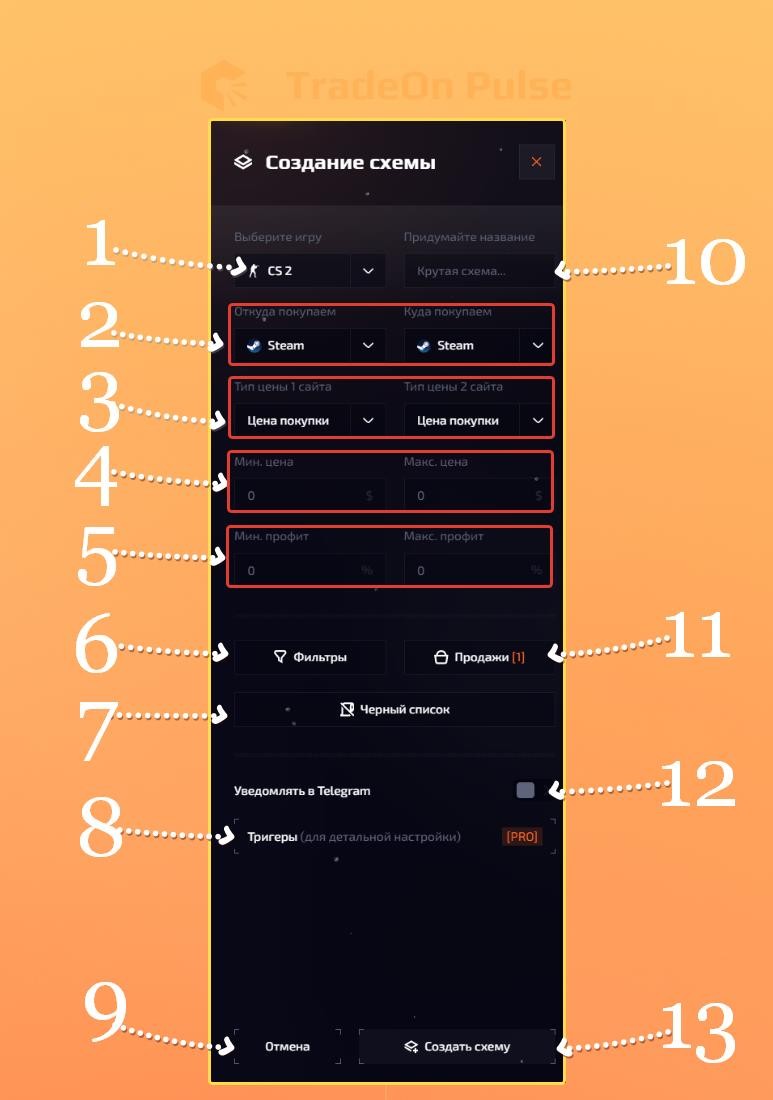
Creating a scheme
To create a scheme, click "Create scheme" in the scheme list. Then fill in all the fields you need.
- Game selection - choose the game you need.
- Where we buy (Where we sell) - choose the site you will buy items from; for the second site choose the one where you will sell items.
- Price type of site 1 (price type of site 2) - choose which price type your items will be evaluated by. Read more about price types here.
- Price range - set the minimum and maximum price of an item that can be searched for by your scheme.
- Profit range - set the minimum and maximum profit %, already including the fee.
- Filters - lets you choose a specific item type or item quality, or on the contrary exclude a specific item type or quality.
- Blacklist - lets you specify items that must never be searched for by your scheme under any circumstances.
- Triggers - a unique Pulse feature that lets you fine-tune item search by adding extra methods of filtering items. Read more here.
- Cancel - clicking the button cancels scheme creation.
- Scheme name - an input where you can enter the name you want.
- Sales - the sales count setting; lets you either set a specific number of sales over a fixed time or set the number of sales over a custom time.
- Telegram notification - when enabled, all found items are sent to the Pulse Telegram bot. For this feature to work, you need to link Telegram to Pulse.
- Create scheme - clicking the button saves all the parameters you entered and creates the scheme.