Analytics
1 min read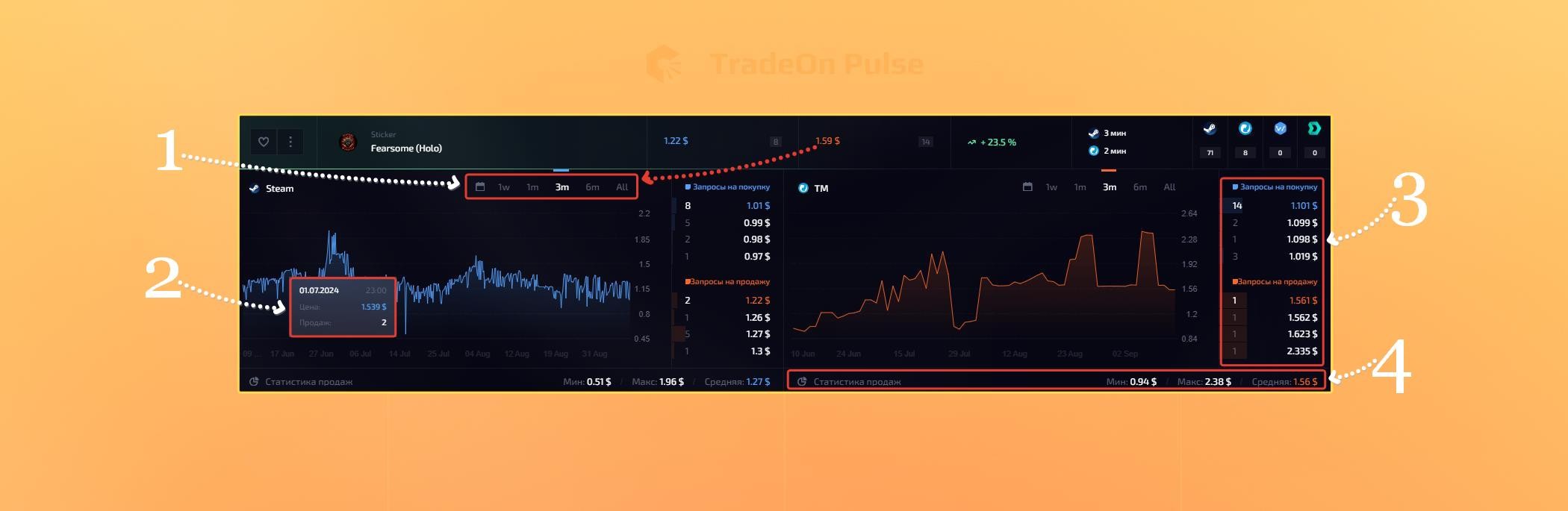
To open analytics for an item, click any of the item's prices.
- "Statistics period" - choose one of the suggested time periods for which the chart and other statistics will be shown.
- "Sales chart" - when you hover over the chart, you can see more detailed statistics for each point. One point on the chart is 1 hour; with a small number of sales, 1 point is 1 sale
- "Buy and sell requests" - show the available lots for buying and selling, their price and quantity.
- "Sales statistics" - shows the minimum, maximum and average price for the period of time you selected.
At the moment, analytics works with the following sites:
Steam
MarketCSGO
Buff163
Waxpeer
Dmarket
Csmoney Trade
Bitskins
GGSwap
CsFloat