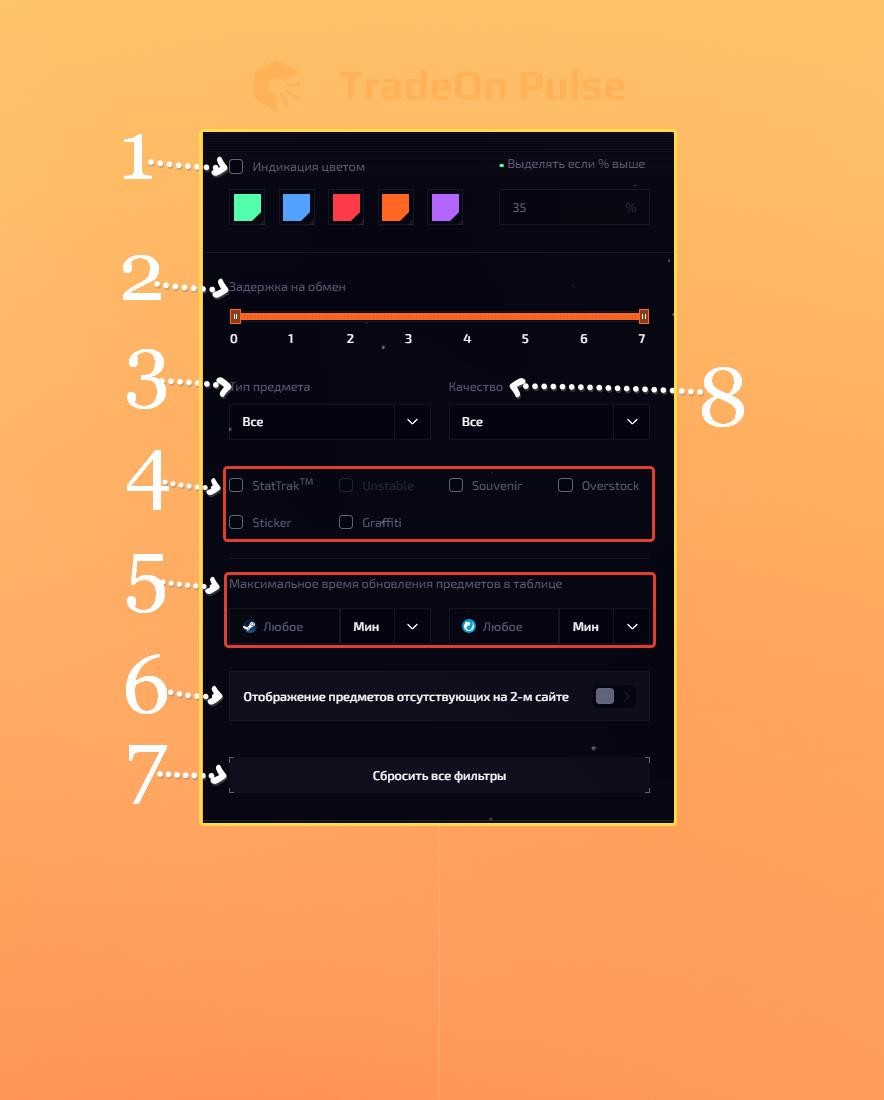
Color indication - lets you set up color-coded display of percentages, which in turn makes working with the table easier.
To set up color indication in the table, enable the "Color indication" checkbox -> choose a color -> specify the profit percentage at which an item will be highlighted with the color you chose .
Trade hold - lets you fine-tune your table and find items with the trade lock you need, or on the contrary search for items with no hold at all.
To sort items by trade hold, use the slider or enable the "show only without hold" checkbox - in that case all items with a hold will be hidden from the table.
Item type - lets you sort the table by a specific item type. You can choose a specific kind of item by type, such as "knife" or "ak-47".
Checkboxes - let you select/deselect a specific item type; created for faster interaction with the table
Maximum update time of items in the table - when a time is entered, only items that were updated in the table sooner than the specified value are shown. Example: you set 5 minutes; all items whose update time is greater than 5 minutes will not be shown in the table.
Show items missing on the 2nd site - when enabled, shows items we have information about but that are not in stock on the 2nd site (the selling site).
Reset all filters - clicking the button resets all the filters set here to their "default" state.
Quality - lets you sort the table by a specific item wear quality.